
Eword2.17.6.1 - Download
You'll be able to download in few seconds.
Publisher Description
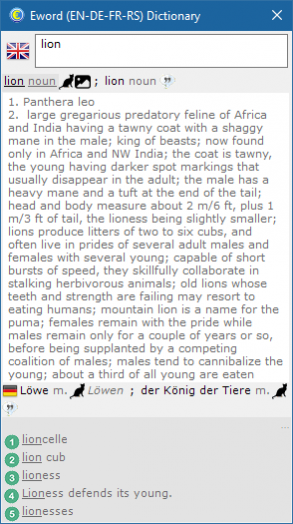
English-German-French-Serbian computer dictionary that offers you power of SQL, quite large word entry database (English language has more than 300,000 entries, all dictionaries have over 200,000 entries), more than half of entries have a description what makes Eword four-lingual four-way simultaneous translation tool and four lingual encyclopedia.
Eword has a very clever user interface, which is simple and almost invisible when not needed and taking only the least possible resources from your desktop and computing power when used. With Euroword you will never need another dictionary, because it is very easy to add new words change existing entries and manage your own vocabulary.
Serbian language is supported in Latin version so it is quite useful for Croats, Bosnians, and possible for Macedonians and Slovenians. It doesn't use local database, all data is fetched from the Net (active internet connection is a must to use this software), so all changes made by other are visibile to all immediately. Also, order of translation terms is determined by relevance, listing more relevant words first. Search is available for words containing term, but more elaborate full text search is also present (sorting found terms by relevance)
About Eword
This Dictionaries program is available in English, Croatian, French, German, Serbo-Croatian. It was last updated on 29 September, 2026. Eword is compatible with the following operating systems: Windows.
The company that develops Eword is Stonito Software. The latest version released by its developer is 2.17.6.1.
The download we have available for Eword has a file size of N/A. Just click the green Download button above to start the downloading process. The program is listed on our website since 2017-05-28 and was downloaded 0 times. We have already checked if the download link is safe, however for your own protection we recommend that you scan the downloaded software with your antivirus. Your antivirus may detect the Eword as malware if the download link is broken.
How to install Eword on your Windows device:
- Click on the Download button on our website. This will start the download from the website of the developer.
- Once the Eword is downloaded click on it to start the setup process (assuming you are on a desktop computer).
- When the installation is finished you should be able to see and run the program.
Program Details
General
System requirements
Download information
Pricing
Version History
version 2.17.6.1
posted on 2017-05-28
Disclaimer
External Download
We do not host Eword on our servers. We did not scan it for viruses, adware, spyware or other type of malware. This app is hosted by the software publisher and passed their terms and conditions to be listed there. We recommend caution when installing it.
The external download link for Eword is provided to you by apps112.com without any warranties, representations or guarantees of any kind, so access it at your own risk.
If you have questions regarding this particular app contact the publisher directly. For questions about the functionalities of apps112.com contact us.
